
Nexus 7 - disable "** more room on this Home screen" message
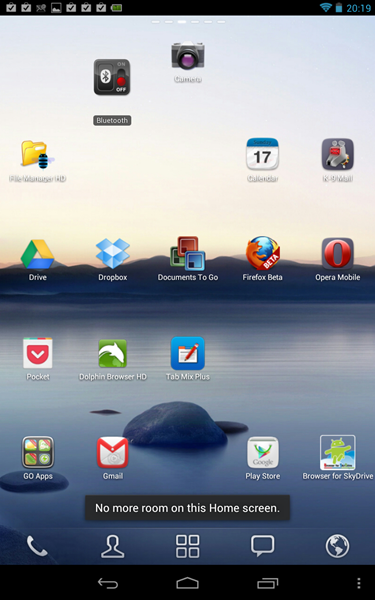
When you add a new app to your Nexus 7 from the Google Play store, you may get the message "** more room on this Home screen" - even though there's actually lots of room for new icons on your Nexus 7's home screen! And, it still adds a shortcut icon for the new app to your home screen anyway(though you may have to swipe sideways to find the home screen that contains it).
This seems to be an issue with Google Play. Unfortunately I can't find an ideal solution. There are 2 workarounds:
If anyone k**ws a permanent solution to this an**yance, please do share!


When you add a new app to your Nexus 7 from the Google Play store, you may get the message "** more room on this Home screen" - even though there's actually lots of room for new icons on your Nexus 7's home screen! And, it still adds a shortcut icon for the new app to your home screen anyway(though you may have to swipe sideways to find the home screen that contains it).
This seems to be an issue with Google Play. Unfortunately I can't find an ideal solution. There are 2 workarounds:
- Live with it! Keep ig**ring the message. (Which is what I've ended up doing). Or,
- You can get rid of the message, but this means that when you install a new app from Google Play, it won't add an icon for it to your home screen. Which might be OK for some…
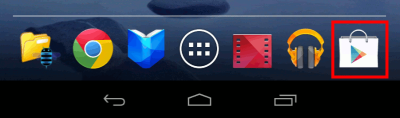
Here's how to stop "** more room on this home screen" from appearing when you add apps:- Open Google Play by tapping its icon (outlined in red below)
- Open its menu (3 vertical dots, top right).
- Choose Settings.
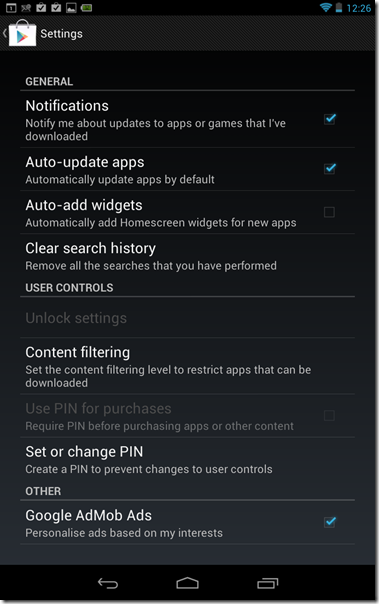
- Finally, UNtick "Auto-add widgets", like so:
- Open Google Play by tapping its icon (outlined in red below)


If anyone k**ws a permanent solution to this an**yance, please do share!